
Sun
The Sun tool tells you where and when the Sun rises and sets, when the golden and blue hours begin, which settings to use and when the Sun will line up with your subject. It has five tabs: Day, Session, Direction, Year and Eclipse.
Place, date and equipment
Section titled “Place, date and equipment”- Place: by default, the phone’s GPS position. Tap it to search an address, enter coordinates or go back to your position with Here. Add the places you often return to your Favourite places: they are shared by the Sun, Moon and Stars tools.
- Date: the arrows move to the previous or next day, Today goes back to the current day and tapping the date opens the calendar.
- Explore the day: a 24-hour strip coloured by the light (night, twilights, blue hour, golden hour, day). Drag it to pick a time; the zoom narrows the view to one hour either side.
- Equipment: the camera and lens shown at the top of the screen are used for the exposure calculations. Tap them to change.
- The share button sends the information of the tab shown.
Day tab
Section titled “Day tab”Everything about the chosen day:
- Sunrise, sunset, day length and solar noon, with the difference from the day before.
- The Sun’s position at the chosen time: elevation, azimuth and shadow ratio (length of an object’s shadow compared with its height).
- The next moment not to miss (golden hour, blue hour, sunrise, sunset…) and how long until it starts. Remind me schedules a notification 15 minutes before.
- Sky colour forecast: once the option is on, each coming sunrise and sunset gets a score out of 100 (excellent, good, fair, poor) estimating the chances of a colourful sky. Medium and high clouds catch the colours; low clouds toward the Sun block the light. This forecast is indicative and needs a connection (data from MET Norway).
- Moments of the day: the timed list of all the light phases, each with its reminder. Past moments can be hidden.
- The Augmented reality and Planner buttons show the Sun’s path in the real scene or on a map.
Session tab
Section titled “Session tab”To prepare the shoot itself:
- Pick the day and time with the strip.
- Set the aperture, the ISO and, if you use one, the ND filter.
- For each light period, the app gives the recommended shutter speed. The current period is highlighted, with the Sun’s current elevation. Tap a period to select it.
- Handheld shooting shows the longest focal length you can use without a tripod at that speed.
- The Equivalent exposure button sends the aperture, ISO and speed of the chosen period to the tool of the same name, to find other combinations of settings.
- The Session plan gives the recommended arrival time to scout, set up the tripod and focus, then each light phase with its start and end times, the kind of light (cool and diffuse, warm with long shadows, backlight) and a matching tip. Each step can trigger a reminder 15 minutes before; Add to calendar puts the session in the phone’s calendar.
When the shutter speed is longer than one second, a floating countdown button times the exposure.
Direction tab
Section titled “Direction tab”When will the Sun be in line? Aim at a subject (street, monument, peak): the app finds the dates in the next 12 months when the Sun rises or sets in that direction.
- Choose sunrise or sunset.
- Set the subject direction by hand or aim with the phone: the compass shows the lens heading. Lock the aim freezes the direction.
- The tolerance widens or narrows the accepted gap around that direction.
- Terrain relief (real horizon) takes mountains and hills into account: the Sun appears later and disappears earlier than over a flat horizon. This option downloads terrain data.
- Two views help you find your way: the sky seen from above (solstice paths dotted, subject direction dashed) and the compass.
- The list of dates found highlights the best day and its time. Tap a date to show it; Plan opens the Planner on that day. If no date fits, the app gives the range of directions the Sun sweeps over the year at that place.
Year tab
Section titled “Year tab”A chart of the year shows sunrise and sunset times, day length and the light phases. The Coming up section lists the notable dates: clock change, shortest or longest day, earliest sunset, latest sunrise, solar eclipse. Below, a table details the chosen month day by day.
Eclipse tab
Section titled “Eclipse tab”The next eclipse visible from here (total, annular or partial): share of the Sun hidden, start, maximum and end times, Sun elevation and duration of totality.
Set the aperture, ISO and filter: a table gives the speed for each phase, with the solar filter for the partial phases and without filter during totality (Baily’s beads, chromosphere, prominences, diamond rings, corona). The Totality sequence suggests a series of exposures to take in a row to blend the corona in HDR.
The calculations use F. Espenak’s Besselian elements (NASA/GSFC).
Understanding the light
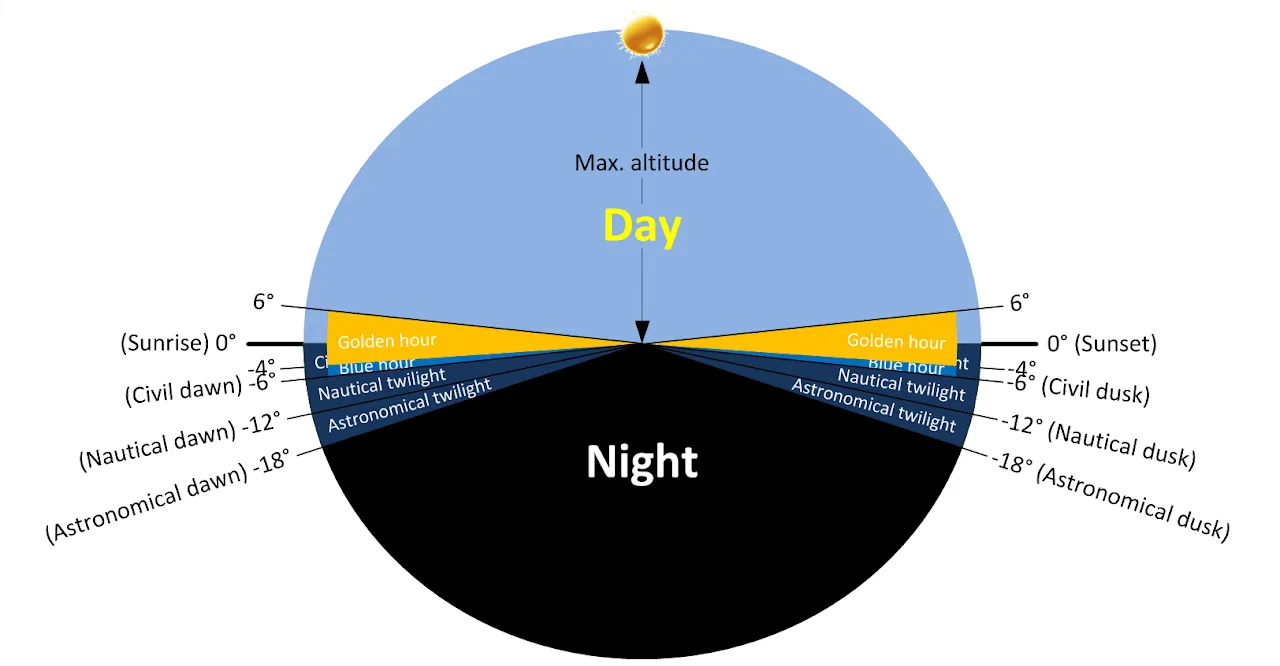
Section titled “Understanding the light”The app divides the day according to the Sun’s elevation above the horizon:
| Period | Sun elevation |
|---|---|
| Golden hour | from 6° to −4° |
| Blue hour | from −4° to −6° |
| Nautical twilight | from −6° to −12° |
| Astronomical twilight | from −12° to −18° |
| Dark night | below −18° |
Shooting tips
Section titled “Shooting tips”- Scout the place in advance: the Direction tab and the Planner show where the Sun will set relative to your subject.
- Exposure: in manual mode, an aperture of f/11 to f/16 gives a deep depth of field, and ISO 100 the best image quality. Underexpose slightly to saturate the colours of the sky.
- Tripod: keeping detail in the shadows without camera shake takes longer exposures.
- Graduated neutral density filter (GND): it darkens the sky without touching the foreground, to balance the two.
- The sky often keeps colouring 10 to 20 minutes after sunset: don’t pack up too soon.